
InDown – Instagram Video Downloader Online
Instagram is one of the most used social media platforms, especially among teens, creators, and young adults. People use it every day to watch short videos, follow trends, learn new ideas, and enjoy content from their favorite accounts. While scrolling, you may find an Instagram video that you want to save on your phone and watch later without opening the app again.
The problem is that Instagram does not provide a direct download option for every video. This is where InDown helps. Our Instagram Video Downloader Online is designed to make video saving simple, fast, and easy for everyone. You only need to copy the Instagram video link, paste it into the downloader box, and download the video in MP4 format when available.
InDown is a web-based tool, so you do not need to install any extra app on your mobile, tablet, or computer. This helps you save storage space and avoid unnecessary third-party apps. The tool works directly from your browser and gives you a clean way to download Instagram videos online.
You also do not need to create an account or share your personal login details. InDown is built for users who want a simple Instagram video download process without signup, login, or complicated steps. Just paste the video link and let the tool handle the rest.
The tool is free to use and made for quick access whenever you want to save a video from Instagram. Before using the downloader, make sure you have copied the correct video link. Also, only download videos that you have permission to use, especially if you plan to repost or share them anywhere else.
You can also use TikTok MP3 downloader to save save audio, sounds, and music from TikTok videos in high-quality MP3 format

How to Use InDown Instagram Video Downloader
Using InDown is simple and does not require any signup or app installation. Just copy the Instagram video link, paste it into the downloader, and save the video to your device in a few quick steps.
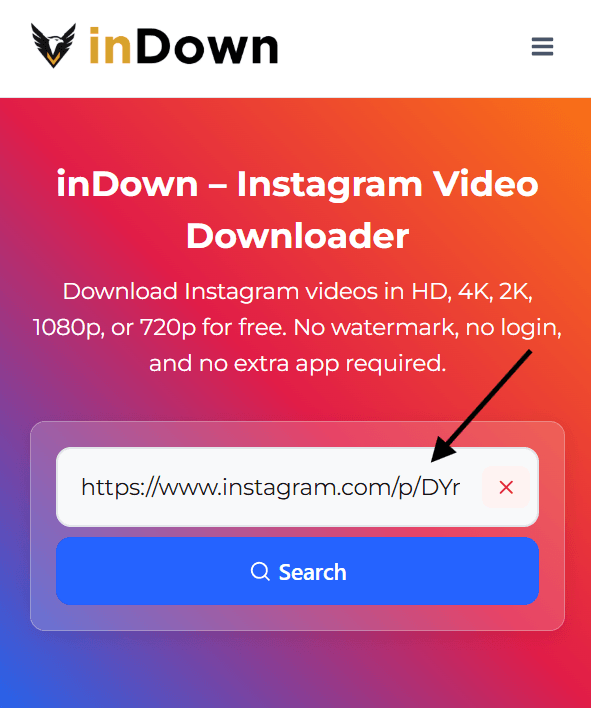
Step 1
Enter Video URL
Copy the Instagram video URL you want to download and paste it into the search box. Make sure the link is correct so the tool can find the video properly.
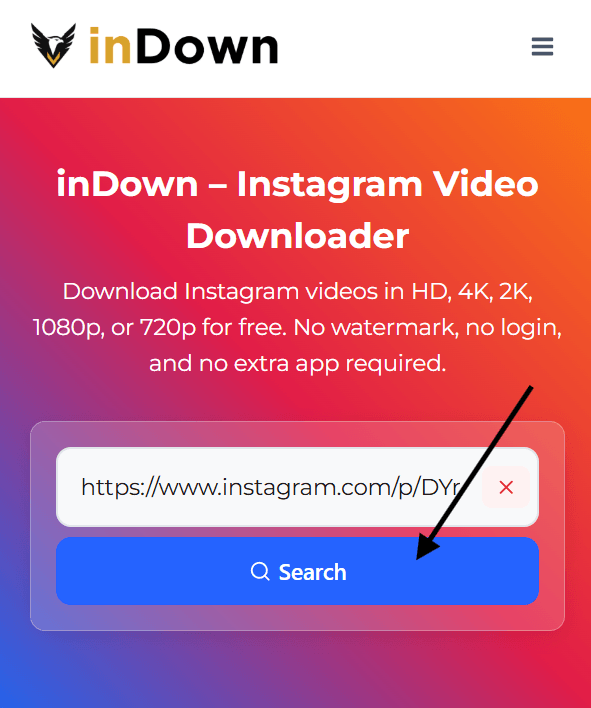
Step 2
Click Search Button to View the Details
Click the search button and wait for the tool to process your Instagram video link. It will fetch the available video file for download.
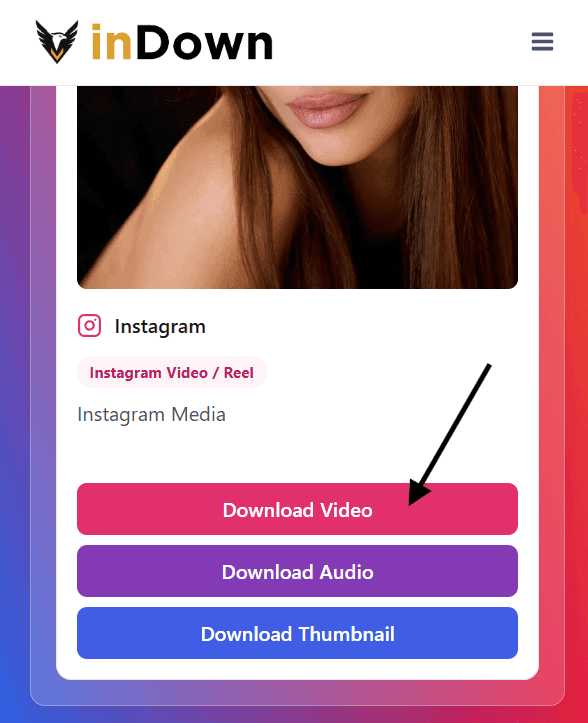
Step 3
Click on Download Video Button
Once the video is ready, click the download video button to save it to your mobile, tablet, or computer.
Download Instagram Videos in HD Quality
InDown works as a simple Instagram Video Downloader that helps you save videos in the available quality directly from your browser. When the original Instagram video is available in HD, the tool allows you to download the best available version provided by the source.
You do not need to install any app or sign in to your account. Just copy the video link, paste it into the downloader, and save the video to your device in MP4 format. This makes it easy to watch your favorite Instagram videos offline whenever you want.
Please note that the final video quality depends on the original video uploaded on Instagram. If the source video is available in clear quality, your download will reflect that available quality to repost or share them anywhere else.
Must Try: IG Audio Downloader
Why Choose inDown
A good Instagram video downloader should be simple, fast, and easy to understand. inDown is designed for users who want to save Instagram videos online without dealing with confusing steps, extra apps, or unnecessary account access.
Instagram Video Downloader
Download Instagram videos from public video links and save them to your device for personal offline viewing.
HD Video Download
Save videos in the best available quality provided by the original Instagram source. The final quality depends on the video uploaded by the creator.
MP4 Format Support
inDown provides Instagram video downloads in MP4 format when available, so the file can play smoothly on most phones, tablets, and computers.
Mobile Friendly
The tool works well on mobile screens, tablets, and desktop browsers, making the download process easy on any device.
No Login Required
You do not need to enter your Instagram username, password, or private account details to download a video.
Fast and Clean Interface
A simple layout, clear input box, and quick processing help users download Instagram videos without distraction.
Benefits Of Using inDown
Users often want to save Instagram videos because some content is useful, entertaining, or worth watching again later. A good Instagram video downloader helps when you want to keep a public video available offline, save a helpful clip for personal reference, or access a video again without searching through Instagram repeatedly.
inDown keeps the process simple. The download box is easy to find, the steps are clear, and users do not have to deal with complicated settings. You only need the Instagram video link, and the tool guides you through the basic paste, search, and download flow.
This page is also built to answer the main questions users usually have before using a downloader. It explains how the tool works, what type of video links are supported, how quality depends on the original Instagram source, and why users should download content responsibly.
- Save public Instagram videos for offline viewing.
- Keep useful tutorial videos available when you have poor internet.
- Store educational or informational clips for personal reference.
- Save workout, travel, food, or lifestyle videos to watch later.
- Avoid searching for the same Instagram video again and again.
- Use a simple browser-based flow without extra download steps.
- Keep important public videos accessible on your own device.
- Download only videos you have permission to save or use.
Instagram Video Downloader On Mobile, Tablet, And Desktop
A modern Instagram video downloader should work smoothly on every device because many users browse Instagram from their phones. inDown is designed to keep the input box, search button, and download action easy to use on mobile screens, tablets, and desktop browsers.
On mobile, the process is simple. Open Instagram, copy the public video link, switch to inDown in your browser, paste the URL, and download the available video file. On desktop, you can copy the video link from Instagram in your browser and paste it into the same downloader box.
This device-friendly experience also helps users move faster without dealing with cluttered layouts or confusing controls. The main tool stays easy to access, while the page still provides helpful instructions for users who want to understand how the download process works.
Must Try: Instagram Reels Downloader
Conclusion
InDown gives users a simple way to save Instagram videos online without making the process difficult. The tool is built around a clean flow where you copy the video link, paste it into the downloader, and save the available video file directly from your browser.
It works well for users who want to keep public Instagram videos for personal offline viewing, quick reference, or later use. The final download quality depends on the original video source, so inDown provides the available version without asking users to choose complicated settings.
Before downloading any video, always respect the original creator’s rights. Use saved videos for personal purposes only, and avoid reposting or reusing content without permission.